
What’s New
In addition to the usual List (Grid) and Kanban Status views, we have introduced a new date- based Kanban views that automatically organises jobs into fixed time-period columns based on active task deadlines, while retaining status visibility through visual indicators on each card. This gives teams an at-a-glance timeline for their work without losing sight of progress.
Jobs are organised in fixed time-period columns according to the earliest active task due date.
Due Date - Weekly Focus
Overdue: Shows all jobs with active tasks past their due date
Due Today: Immediate visibility on what needs attention today
Due Tomorrow: Immediate visibility on what needs attention by tomorrow
Due This Week: Shows jobs due between day after tomorrow and end of current week (Sunday). Excludes Today and Tomorrow to avoid duplication.
Due Next Week: Includes jobs due between next week Monday and Sunday. Excludes Today and Tomorrow to avoid duplication.
Due Date - Monthly Planning
Due This Month: All jobs that are due this month.
Due Next Month: All jobs that are due next month.
Due Later: All jobs with due dates in months after next.
Jobs automatically move between columns when tasks are completed or due dates change.
In addition, we are adding the ability to edit the due date on cards and improved the display when multiple tags are in use.
To switch between available Kanban display options, select the gear icon on the right
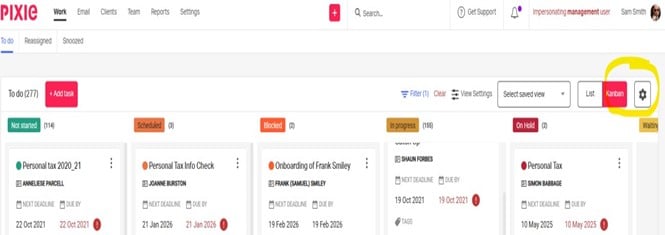
These Kanban views are available on the My Day work page > To do tab as well as on the Team > Work Report where cards can be grouped by Assignees.
Next, we aim to improve the user experience around the filters, view settings and saved view selection to consolidate the actions on one modal.
User benefits
At-a-glance weekly and monthly in progress visibility – Immediately see workload distribution across today, tomorrow, this week, next week, and also monthly or future periods.
Reduced filter dependency – No need to manually filter by due date ranges to understand the workload timeline.
Proactive deadline management – Earlier identification of approaching deadlines reduces last-minute rushes and supports better capacity planning across the team.
The enhanced date-based Kanban views for jobs are available in the upcoming release. Administrators and practice managers can then start using the new views alongside the existing status-based Kanban, which remains available with only minor interface changes to improve the card display.